
To buy Bitcoin with Binance.us, you need a verified account and a funded balance, and you need to know which order type to use when you place your BTC purchase. This guide covers every step, from checking whether Binance.us is available where you live to deciding what to do with your Bitcoin once the order fills.
Last checked: September 2026. Fees, supported states and payment methods can change, so confirm the current details on Binance.us before you buy.
Can You Use Binance.us Where You Live?
Check eligibility first. Binance.us operates only in the United States, and not every state is supported.
States Where Binance.us Is Not Available
According to the Binance.us Help Center (last updated June 3, 2026), residents of these states and territories cannot open an account:
- Alaska
- American Samoa
- Connecticut
- Georgia
- Guam
- Maine
- New York
- North Carolina
- North Dakota
- Ohio
- Oregon
- Texas
- U.S. Virgin Islands
- Vermont
- Washington
Crypto-Only States
Residents of Kansas and Wisconsin can sign up, but only as crypto-only users. That means no USD deposits and no linked bank account. If you live in one of these states, you would have to transfer crypto into Binance.us from another wallet or exchange instead of buying Bitcoin with dollars directly.
If your state isn’t listed, you should be able to buy BTC with USD on the platform.
Step 1: Create and Verify Your Binance.us Account
- Go to binance.us or download the Binance.us app (iOS or Android).
- Sign up with your email address and create a strong password.
- Turn on two-factor authentication (2FA). Use an authenticator app instead of SMS if you can.
- Complete identity verification (KYC). You’ll usually be asked for personal details such as your legal name, date of birth and residential address, plus a government-issued ID. The sign-up screens show exactly what’s required.
You can’t deposit funds or buy Bitcoin until verification is approved. Approval is often quick, but it can take longer if your documents need manual review.
Step 2: Fund Your Account
There are three ways to get money onto Binance.us before buying Bitcoin.
Bank Transfer (ACH)
Binance.us restored USD deposits and withdrawals by ACH bank transfer in 2025. ACH is the main way to fund an account with dollars, and Binance.us lists ACH deposits and withdrawals as free.
To deposit:
- Open Wallet and choose Deposit, then USD.
- Link your bank account.
- Enter the amount and confirm.
Your bank sets its own ACH limits, and Binance.us may apply account-level limits too. The app shows any limits or holding periods before you confirm, so check them if you plan to buy Bitcoin the same day.
Wire Transfer and Card Payments
The Binance.us fee page also lists wire deposits (no Binance.us fee, although your bank may charge one) and debit/credit card purchases at 3.99%. Card purchases are the fastest way to buy BTC, and also the most expensive. Which of these options you see can depend on your account and location.
Depositing Crypto
If you already hold crypto somewhere else, you can deposit it for free and then trade it for Bitcoin. For crypto-only users in Kansas and Wisconsin, this is the only route.
Step 3: Choose How to Buy Bitcoin
Binance.us gives you two main ways to buy BTC. The price you end up paying depends heavily on which one you use.
Option A: Buy / Convert (Simple)
The Buy and Convert screens are the easiest to use. Pick Bitcoin, enter how much you want to spend, review the quote and confirm.
The trade-off is cost. Binance.us states that Buy, Sell and Convert fees are built into the price as a spread instead of charged as a separate trading fee. You won’t see a fee line item, but the rate you get is usually worse than the market price on the order book.
Best for: first-time buyers making small, one-off purchases who value simplicity.
Option B: Spot Trading (Lower Cost)
The Trade section, available in Basic or Advanced view, lets you buy Bitcoin directly from the order book using a pair such as BTC/USD.
At the time of writing, Binance.us lists a 0% maker fee and a low taker fee on spot trades. Some pairs have their own promotional fee tiers, so check the official fee schedule for the current rate on the BTC pair you plan to trade. Paying trading fees with BNB gives a small additional discount.
You’ll pick one of two order types:
- Market order. Buys immediately at the best available price. Fast and simple, but it counts as a taker trade.
- Limit order. Buys only at the price you set or lower. It may not fill right away, but if it sits on the order book before filling, it can qualify as a maker trade.
Best for: anyone buying larger amounts or buying regularly, where fee differences add up.
Step 4: Place Your Bitcoin Order
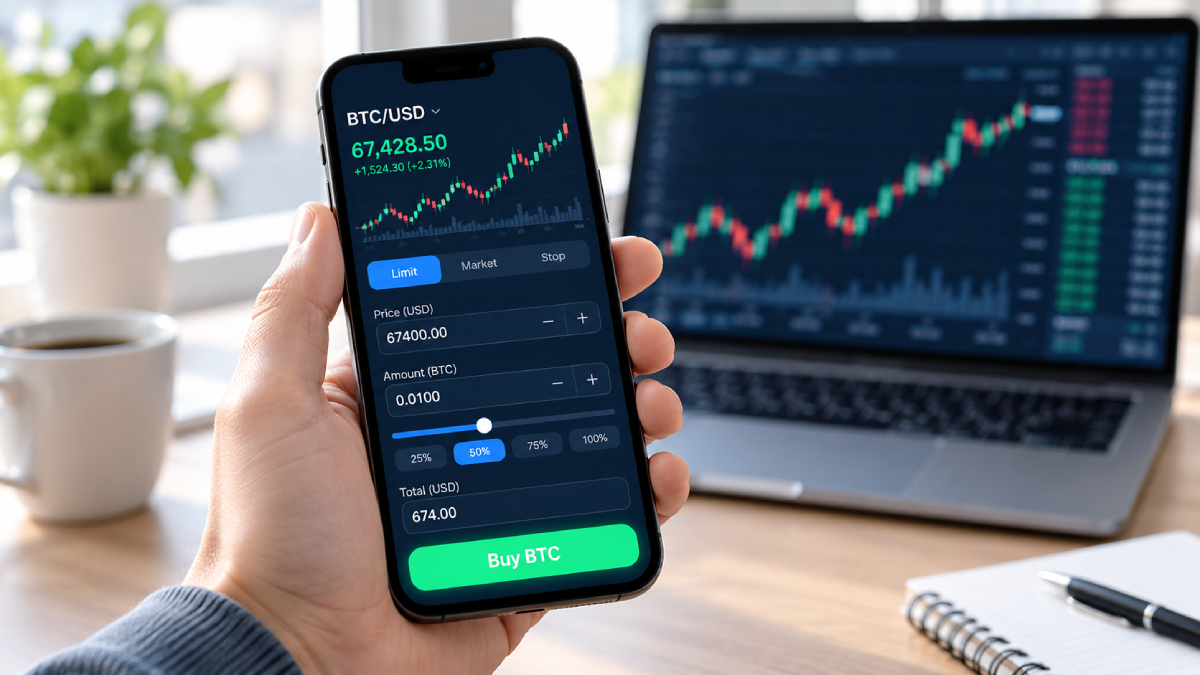
Here’s a spot limit order on BTC/USD as an example:
- Go to Trade and search for BTC/USD.
- Select Buy and choose Limit.
- Enter your price per BTC and either the amount of BTC or the USD total.
- Review the order summary, including the estimated fee.
- Confirm.
Open orders show in your order history until they fill or you cancel them. When the order fills, the Bitcoin appears in your Binance.us wallet.
You don’t need to buy a whole Bitcoin. BTC is divisible, so you can buy a fraction of one as long as you meet the minimum order size shown on the trade screen.
Step 5: Decide Where to Keep Your Bitcoin
Once you’ve bought Bitcoin with Binance.us, you have two main options:
- Keep it on Binance.us. This is convenient if you plan to trade or sell soon. The exchange holds the keys for you.
- Withdraw to a personal wallet. A hardware or software wallet you control gives you your own keys. Binance.us charges a variable network-based fee for crypto withdrawals. Always check that the address and network are correct before you send.
Many long-term holders move their BTC to self-custody. Active traders often keep part of their balance on the exchange.
Binance.us Bitcoin Fees at a Glance
| Action | Cost (as listed, Sept 2026) |
|---|---|
| ACH deposit | Free |
| Wire deposit | $0 from Binance.us (bank fees may apply) |
| Debit/credit card | 3.99% |
| Buy / Convert | Spread built into price |
| Spot trade: maker | 0% |
| Spot trade: taker | Low % fee, varies by pair and volume |
| ACH withdrawal | Free |
| Wire withdrawal | $25 + bank fees |
| BTC withdrawal | Variable (network-based) |
Fees can change at any time. The official Binance.us fee schedule always has the current rates.
Fees can change at any time. The official Binance.us fee schedule always has the current rates.
Common Mistakes When Buying BTC on Binance.us
- Signing up before checking your state. If you live in an unsupported state, you won’t get through onboarding.
- Using Buy/Convert for large amounts. The built-in spread can cost much more than a spot trade.
- Paying by card when ACH is available. 3.99% on every purchase adds up quickly.
- Skipping 2FA. Secure the account before you add money to it.
- Sending BTC on the wrong network. Double-check the withdrawal network and address every time.
Frequently Asked Questions
Is Binance.us the same as Binance?
No. Binance.us is a separate platform for U.S. customers. It has its own account system, features and supported assets.
Can I buy Bitcoin on Binance.us with a debit card?
The Binance.us fee page lists debit/credit card purchases at 3.99%. Card availability can depend on your account, and for regular purchases ACH is the cheaper option.
How long does it take to buy Bitcoin on Binance.us?
A spot market order or Buy/Convert order fills almost instantly once your account is funded. Most of the waiting usually comes from account verification and ACH deposits settling.
Can I buy Bitcoin with Binance.us if I live in Texas or New York?
No. As of the Help Center’s June 2026 update, both are on the unsupported list.
What’s the cheapest way to buy Bitcoin on Binance.us?
Generally, fund your account by ACH and then place a limit order on the spot market. That combination avoids card fees and the Buy/Convert spread.
This article is for information only and is not financial advice. Cryptocurrency prices are volatile, and you can lose money. Check current terms on Binance.us before making any purchase.